
Functions and function blocks
Besides programs, ProtoCode lets you create two kinds of reusable code units (in the standard, POUs: Program Organization Units):
| Function (FC) | Function block (FB) | |
|---|---|---|
| Memory | No: remembers nothing between calls | Yes: each instance keeps its state |
| Result | Always the same for the same inputs | Depends on the inputs and the previous state |
| Use | Calculations, conversions, comparisons | Timers, counters, sequences, controllers |
| Instances | Not needed | One instance per independent use |
| Variable sections | Input, Output, InOut, Local | Input, Output, InOut, Local, Instance |
| Languages | Ladder, FBD, ST | Ladder, FBD, Grafcet, ST |
Create a function or function block
Section titled “Create a function or function block”-
Press Home → New file.
-
Choose Function or Function block, enter the name (e.g.
ScalePctorMotorStarter) and the language.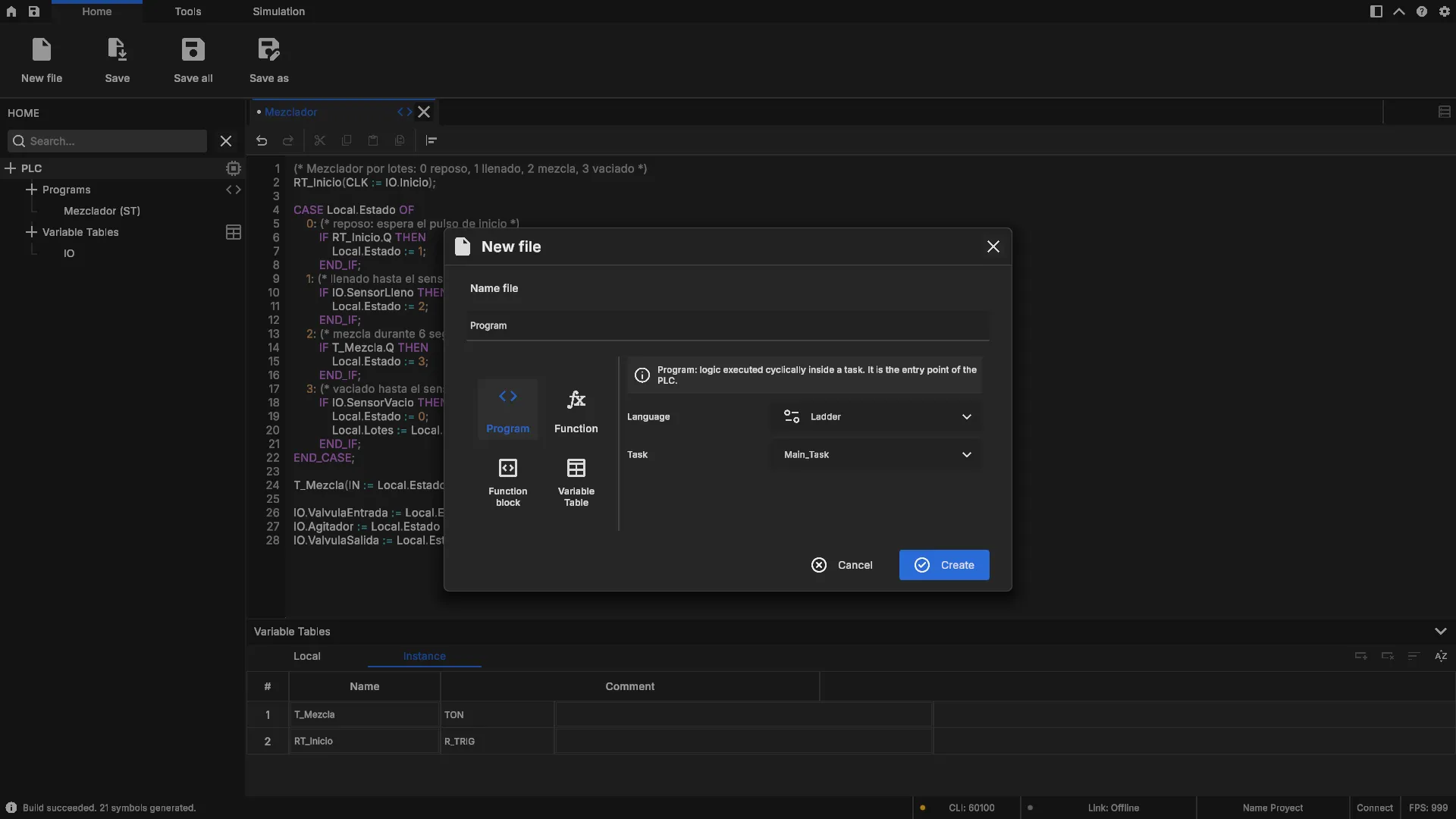
-
In the bottom Variable Tables panel, define its interface:
- Input: input parameters (they become the block’s left pins).
- Output: results (right pins).
- InOut: parameters the block reads and modifies.
- Local: internal variables.
-
Write the logic using those variables as
Input.X,Output.Y,Local.Z. -
Compile. The block shows up in the Library of every editor, in the project category, ready to drag.
Example: scaling function
Section titled “Example: scaling function”Function ScalePct in ST with:
- Input:
Raw : INT,Max : INT - Output:
Pct : REAL
IF Input.Max > 0 THEN Output.Pct := LIMIT(0.0, Input.Raw * 100.0 / Input.Max, 100.0);ELSE Output.Pct := 0.0;END_IF;Example: motor starter function block
Section titled “Example: motor starter function block”Function block MotorStarter in ST that wraps start/stop with overload protection and a start-up time:
- Input:
Start : BOOL,Stop : BOOL,Overload : BOOL,StartTime : TIME - Output:
Motor : BOOL,Starting : BOOL,Fault : BOOL - Instance:
T_Start : TON
Output.Motor := (Input.Start OR Output.Motor) AND Input.Stop AND NOT Input.Overload;
T_Start(IN := Output.Motor, PT := Input.StartTime);Output.Starting := Output.Motor AND NOT T_Start.Q;
Output.Fault := Input.Overload;
To use it from an ST program, declare one instance per motor in the program’s Instance table (M1 : MotorStarter, M2 : MotorStarter) and call them:
M1(Start := IO.Start1, Stop := IO.Stop1, Overload := IO.Ovl1, StartTime := T#3s);IO.Motor1 := M1.Motor;
M2(Start := IO.Start2, Stop := IO.Stop2, Overload := IO.Ovl2, StartTime := T#5s);IO.Motor2 := M2.Motor;
Each instance remembers its own state, so the two motors work independently.
In Ladder and FBD just drag MotorStarter from the library: the instance is created automatically with a name you can change.
Function blocks in Grafcet
Section titled “Function blocks in Grafcet”An FB can be written in Grafcet: that way you wrap a whole sequence (for example a station’s cycle) and reuse it several times. From a Grafcet you can also run FB instances as step actions (Function block type in the action inspector).
Good practices
Section titled “Good practices”- Give instances descriptive names (
T_Mix,C_Parts) and use the Comment column of the Instance table. - Do not read or write global variables (
IO.…) inside a reusable FB: pass them as Input/Output so the block works for any machine. - Renaming a function or FB from the project tree updates every call and instance automatically.