
Variables and tables
Every PLC signal and piece of data is declared as a variable inside a table. ProtoCode has two scopes:
| Scope | Where they are declared | How they are written in code |
|---|---|---|
| Global | Project variable tables (Variable Tables group in the tree) | Table.Variable, e.g. IO.Motor |
| Local | Sections of the program, function or block itself (bottom Variable Tables panel) | Local.Variable, e.g. Local.Estado |
Global tables
Section titled “Global tables”Create a table with Home → New file → Variable Table. A project can have several (e.g. IO, Markers, Recipes) and any program can use their variables.
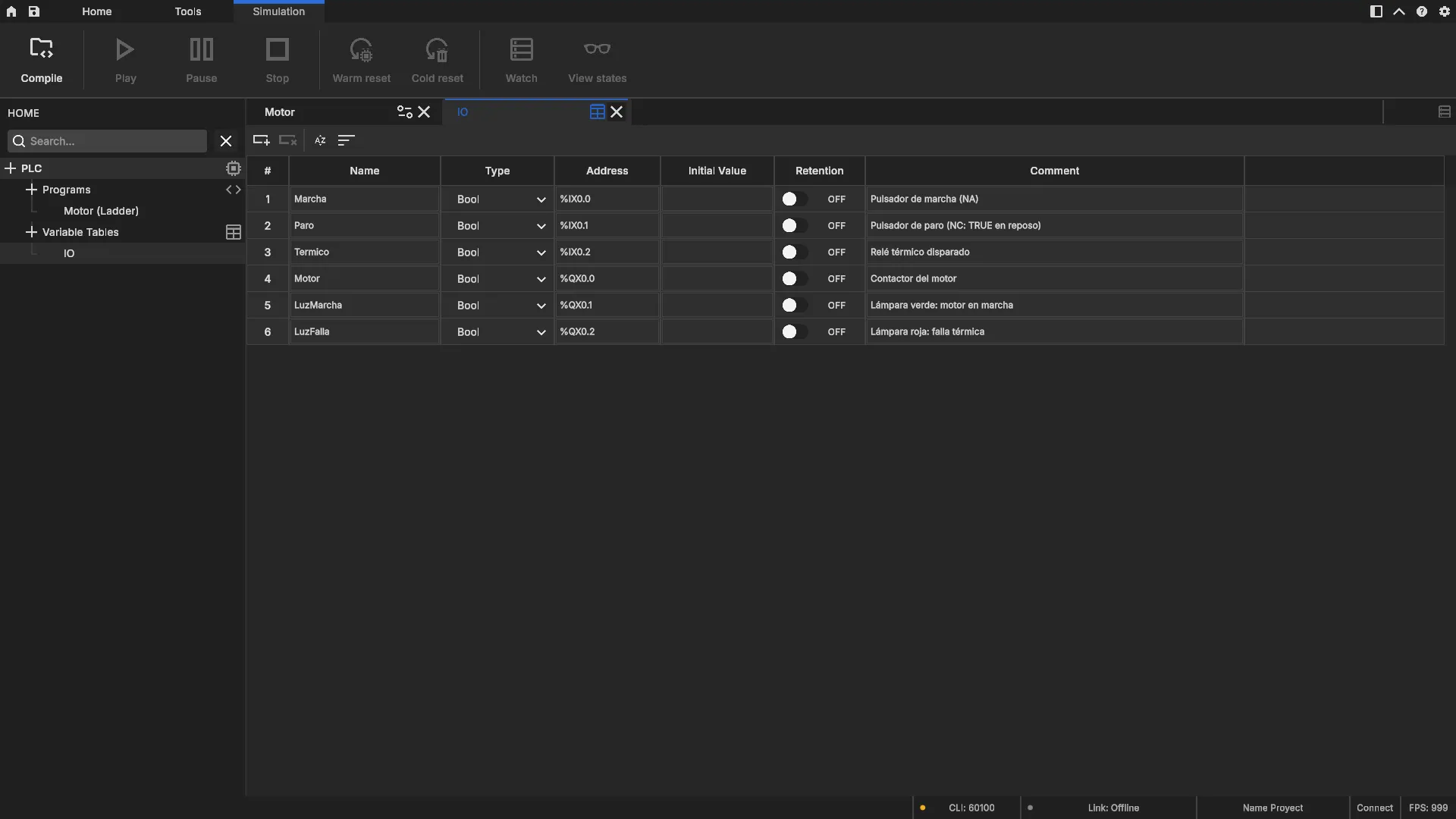
| Column | Description |
|---|---|
| # | Position. Drag the row to reorder it. |
| Name | Name (IEC identifier: letters, digits and _, no spaces, not starting with a digit). Must be unique in the table. |
| Type | Data type (see below). |
| Address | Optional physical address (%IX0.0, %QW4…). Without an address the variable is internal. |
| Initial Value | Value at start-up or after a cold reset. Empty = the type’s default. |
| Retention | When on, the variable keeps its value after a warm reset. |
| Comment | Free description. |
Table toolbar: add row, delete row, sort alphabetically and sort by address. Right-click a row for insert, duplicate, move up, move down, copy and delete.
Data types
Section titled “Data types”| Type | IEC | Address size | Default | Range / use |
|---|---|---|---|---|
| Bool | BOOL |
X (bit) |
FALSE |
TRUE / FALSE |
| Int | INT |
W (16 bits) |
0 |
−32,768 … 32,767 |
| DInt | DINT |
D (32 bits) |
0 |
−2,147,483,648 … 2,147,483,647 |
| Real | REAL |
D (32 bits) |
0.0 |
Floating-point number |
| Word | WORD |
W (16 bits) |
0 |
16 unsigned bits, for bit operations |
| DWord | DWORD |
D (32 bits) |
0 |
32 unsigned bits |
| Time | TIME |
D (32 bits) |
T#0ms |
Durations: T#500ms, T#5s, T#1m30s |
Addresses
Section titled “Addresses”Addresses follow the IEC syntax: % + area + size + byte [+ .bit].
| Area | Meaning |
|---|---|
I |
Inputs |
Q |
Outputs |
M |
Markers (internal memory) |
| Size | Meaning | Example |
|---|---|---|
X |
Bit (needs .bit from 0 to 7) |
%IX0.0, %QX1.7, %MX10.3 |
W |
16-bit word | %IW0, %QW4, %MW10 |
D |
32-bit double word | %ID8, %MD20 |
- The
%is optional and the size can be omitted when it can be inferred:I0.0is the same as%IX0.0. - The address must match the type: a
BOOLusesX, anINTorWORDusesW, and aREAL,DINT,DWORDorTIMEusesD. - ProtoCode detects overlaps:
%MW0covers bits%MX0.0to%MX1.7, so they cannot be assigned to another variable at the same time.
An invalid or conflicting address is highlighted in red in the table.
A file’s local variables
Section titled “A file’s local variables”Every program, function and function block has its own tables in the bottom Variable Tables panel (expand it with the arrow on the right).
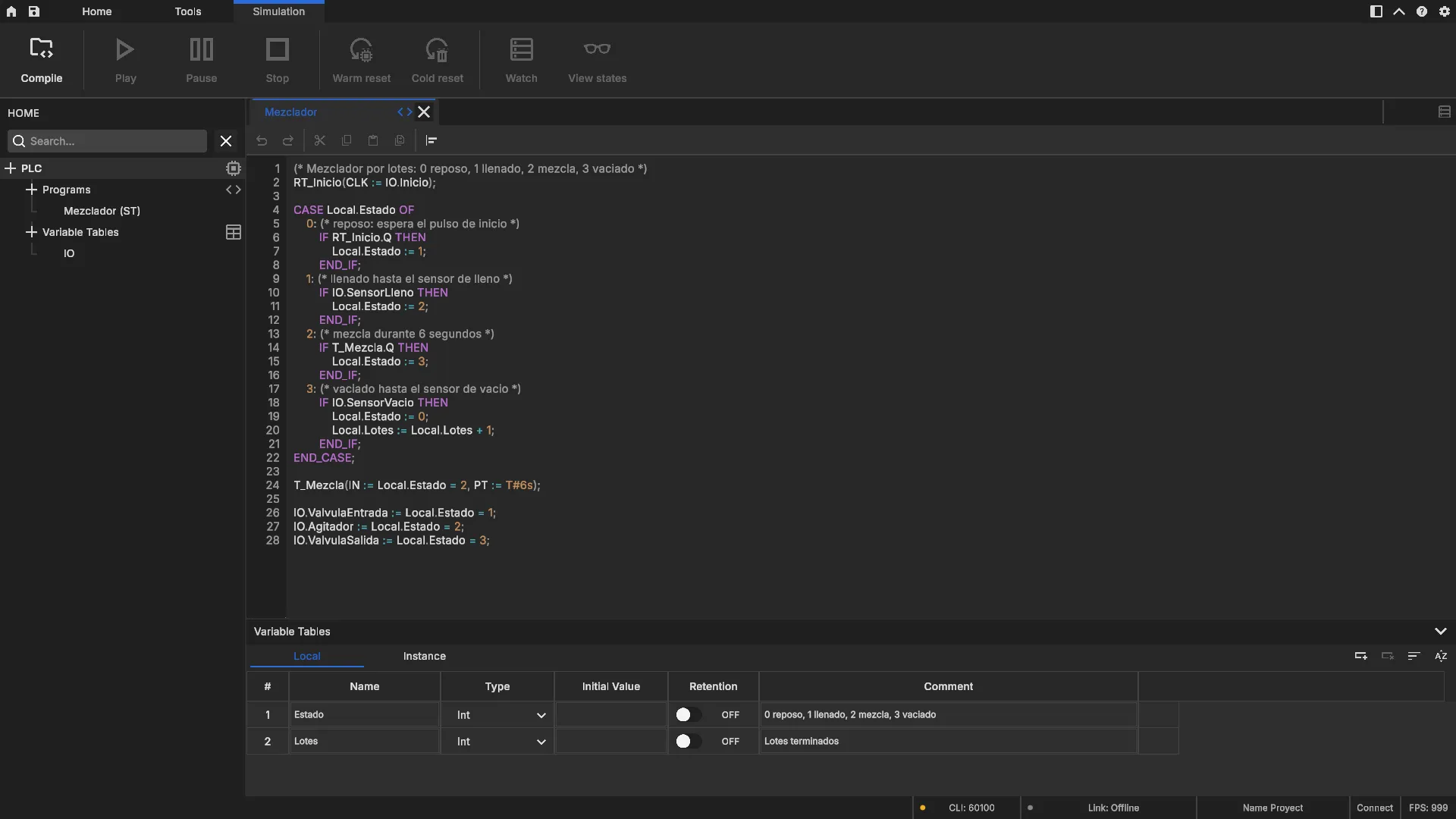
| Section | Available in | Purpose |
|---|---|---|
| Local | Programs, functions and FBs | Internal working variables. In programs and FBs they keep their value between scans. |
| Input | Functions and FBs | Input parameters (the block’s input pins). |
| Output | Functions and FBs | Output parameters (the block’s output pins). |
| InOut | Functions and FBs | Parameters passed by reference. |
| Instance | Programs and FBs | Function block instances used in the file (e.g. T_Mezcla : TON). |
In Ladder and FBD the Instance table fills itself when you place a block with memory (timer, counter…), and the instance name can be edited in either place. In ST you declare the instances there and then call them in the code.
Picking variables from the editors
Section titled “Picking variables from the editors”In the inspector (Properties) of any element, the Variable field offers:
- Autocomplete while typing, filtered by compatible type.
- An indicator below with the chosen variable’s address and type (✓ when valid).
- The … button, which opens the variable picker: a tree with the Globals, Locals and Instances tables on the left, their variables on the right and a form to create a new variable without leaving the editor (New).
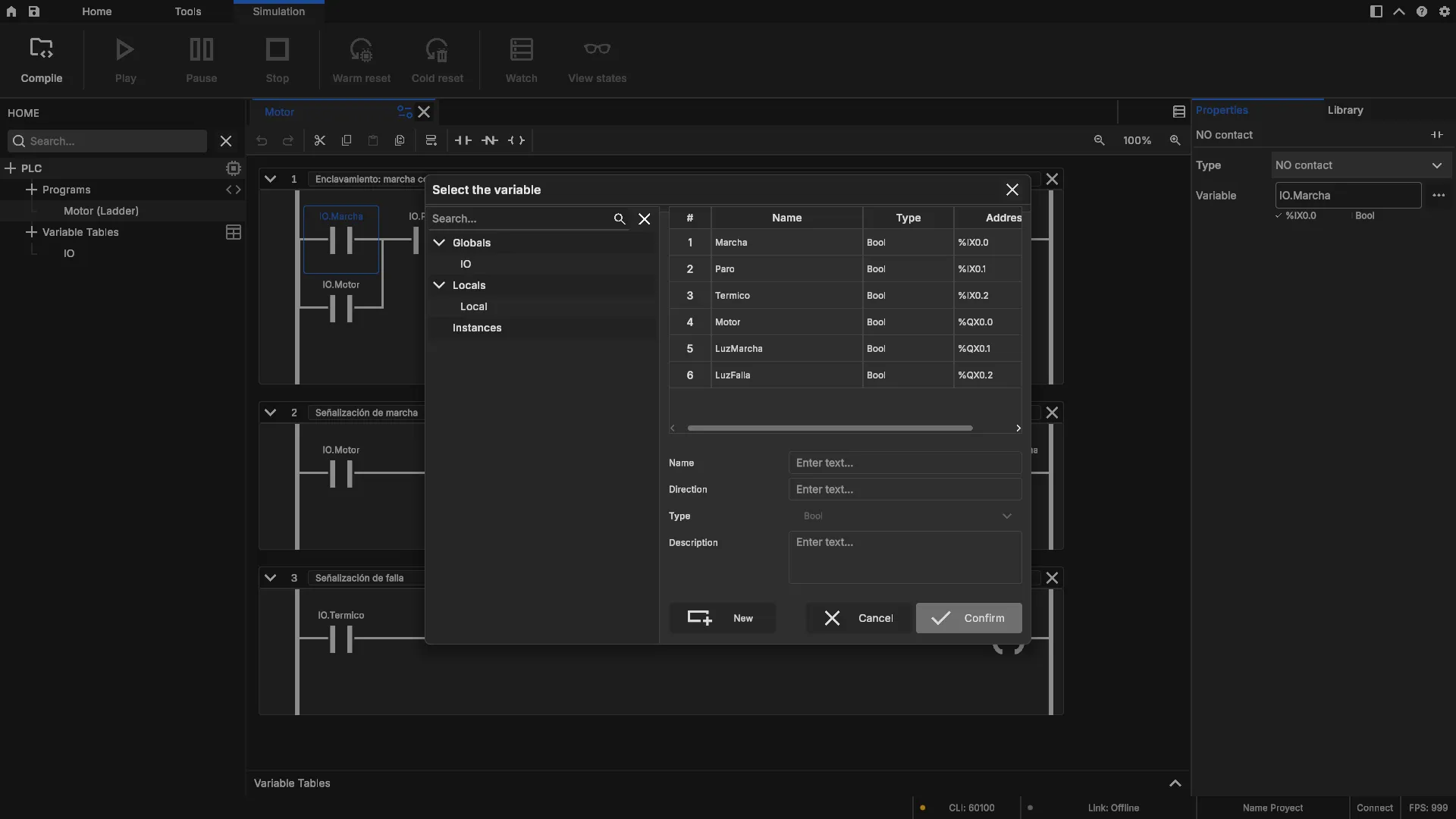
You can also type a literal directly (TRUE, 10, 2.5, T#5s) in operands that accept one (block inputs, for example).
Tables during simulation
Section titled “Tables during simulation”While the simulation runs, tables are locked (not editable) and right-click offers forcing options instead. See Simulation.